
LATEST FEATURES

LATEST

RenWeb Now Called FACTS: Login, District Code & Portal Help
Have you searched for RenWeb login or RenWeb district code? Then you are in the right place. RenWeb was a popular school tool used by thousands of private schools in the United States. Over the years, it got a new name. Today, it is called FACTS SIS and the FACTS Family Portal.
This guide tells you everything you need to know about RenWeb in 2025. You will learn how to log in, find your district code, fix problems, and use the app. It does not matter if you are a parent, student, teacher, or admin. This guide has simple steps for everyone.
By the end, you will know how to use the FACTS Family Portal with ease.
What Is RenWeb? How It Became FACTS Management
RenWeb started as a school software many years ago. Schools used it to track grades, attendance, and student records. It was a great tool for private and faith-based schools.
In 2014, a company called FACTS Management bought RenWeb. FACTS and RenWeb then worked together as one platform. Today, the old RenWeb system is now called FACTS SIS. SIS stands for Student Information System. The login page for parents is now called the FACTS Family Portal.
The name changed, but the system still works the same way. Many people still search for RenWeb because they used it for years. FACTS kept the old login links at logins2.renweb.com so users could still find it.
Why RenWeb Is Now Called FACTS SIS
FACTS Management had a big goal. They wanted one system that does everything. This system would handle grades, tuition, and parent communication all in one place. So, they merged RenWeb into the FACTS platform.
This made life easier for schools. Before, schools used different tools for different jobs. Now, one login covers everything. Even though the name changed, many schools still call it RenWeb out of habit. That is okay. Both names point to the same system.
The Role of RenWeb in Modern K-12 Schools
RenWeb, or FACTS SIS, helps K-12 schools run smoothly. Teachers use it to enter grades every day. Parents check attendance from home. Admins manage enrollment and payments. Everything happens in one place.
The system is very popular in Christian and Catholic private schools. It serves over 12,000 schools across the country. More than two million students use it. Over 1,000 churches and parishes also use it. That shows how trusted and widely used it is.
35 Years of Experience in School Technology
FACTS Management has worked in education for over 35 years. That is a long time. This experience helps them build better tools every year. Schools trust FACTS because it has been reliable for decades. The platform keeps getting better with new features like mobile apps and real-time grade updates.
How to Log In to the FACTS Family Portal (RenWeb Login Guide)
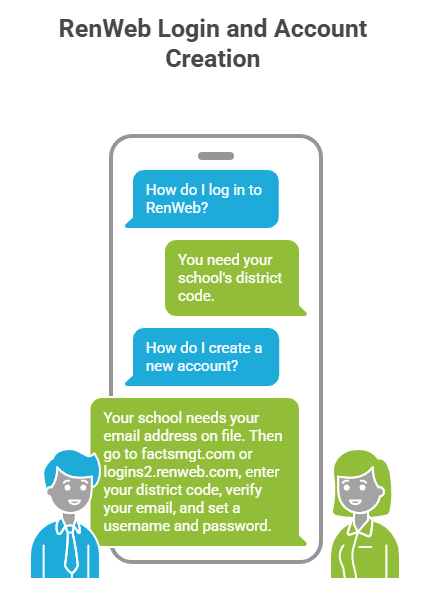
The most common search about RenWeb is how to log in. The process is simple. But you need one key thing first. You need your school’s district code. Without it, you cannot log in.
How to Create a New Account
If this is your first time, you need to create an account. Your school must have your email address in the system first. Ask your school’s front office to confirm this. Once that is done, follow these steps.
Step 1 – Go to the Login Page
Open your web browser. Go to factsmgt.com or logins2.renweb.com. Both websites take you to the same login screen. If your school gave you a direct link, use that. It may already have your district code filled in.
Step 2 – Enter Your School’s District Code
The district code is a short code. It looks something like CCS-TX or GCA-IN. Every school has its own code. You cannot log in without it. If you do not know your code, call your school’s office. Some schools also put it on their website or in welcome emails.
Step 3 – Verify Your Email and Set a Password
After you enter the district code, type your email address. This must be the email your school has on file. Then click Create Account. The system sends you an email. Open that email and click the link inside. Then create a username and password. Save these details. You will need them every time you log in.
Parent Login vs Student Login
Parents and students see different things when they log in. Parent accounts show the most information. Parents can see grades, attendance, tuition bills, and school news. They can also pay fees and update contact info.
Student accounts show less. Students can see their own grades, homework, and class schedule. They cannot see billing or family account settings. This keeps private information safe.
Teacher and Admin Login
Teachers log in through the FACTS SIS staff portal. They can enter grades, take attendance, and send messages to parents. Admins have full access. They can see all student records, manage enrollment, and run reports. Admin logins are set up by the school’s IT team.
Key Features of RenWeb SIS
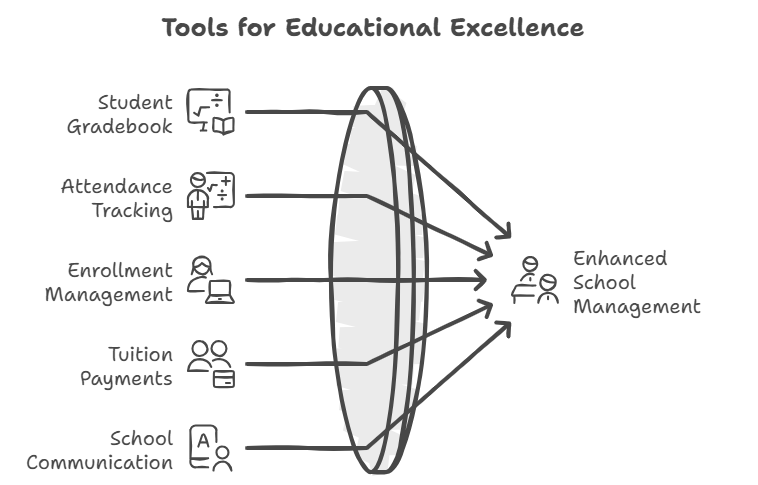
RenWeb, now FACTS SIS, has many useful tools. Schools use it for much more than just grades. Here is a look at the main features.
Student Gradebook and Grades
The gradebook is one of the most used parts of the system. Teachers enter scores for tests, quizzes, and projects. The system adds up the grades and shows the average. Parents and students can see the grades right away after the teacher saves them.
The system also calculates GPA for high school students. Teachers can create report cards directly in the system. This saves a lot of time at the end of each term.
Attendance and Behavior Tracking
Teachers take attendance inside the system every day. If a student is absent, the school office sees it right away. Parents also get a notification. The system can track behavior too. Teachers can write notes about student conduct. Parents and admins can see these notes.
Enrollment and Admissions
FACTS SIS helps schools manage new students. Parents can apply online. They upload documents like birth certificates directly into the system. Admins can track each application. They can manage waitlists and send updates to families. This removes the need for paper forms.
Tuition and Payment Tools
Paying school fees is easy with FACTS. Parents can see their balance online. They can pay with a credit card or set up automatic monthly payments. Schools can send invoices and set up payment plans. This helps families stay on top of their bills.
School News and Communication
Schools post news and events in the portal. Parents get alerts by email or app notification. Teachers can send messages to parents from inside the system. This keeps all communication in one safe place.
How to Fix Common RenWeb Login Problems
Sometimes logging in does not work. Do not worry. Most problems have simple fixes. Here are the most common issues and how to solve them.
How to Check If RenWeb Is Down
If the page will not load, the system might be down. Go to status.factsmgt.com to check. This page shows if the system has any problems. If it is down, wait a little while and try again. FACTS fixes most issues quickly.
How to Fix Login Errors
Still having trouble? Try these steps. First, clear your browser’s saved data. Old data can cause login errors. Second, try a different browser like Chrome or Firefox. Third, try an incognito or private window. Make sure you are using the right website address. Double-check your district code and email too.
How to Find Your District Code
The district code is not public. There is no online list of all codes. Your school gives it to you. Check your welcome email from the school. Look on the school’s website under the parent portal section. If you still cannot find it, call the school office. They will give it to you right away.
How to Reset Your Username or Password
Forgot your password? Go to the login page. Click the link that says Forgot Username or Forgot Password. Type your email address. The system sends you a reset link. Click it and create a new password. Check your spam folder if you do not see the email in your inbox.
The FACTS Family App (Formerly the RenWeb App)

You do not have to use a computer to check the portal. FACTS has a free mobile app. It lets parents and students check grades and get alerts from their phone.
How to Download the App
The app is called FACTS Family. Search for it in the Apple App Store or Google Play Store. Download it for free. Open the app and log in with your usual username and password. You will also need your district code the first time.
Is the App Free?
Yes, the FACTS Family App is free to download. You do not need to pay to use it. However, your school must have an active FACTS subscription. If your school uses FACTS SIS, you can use the app for free as part of that plan.
How to Turn On Grade and Attendance Alerts
The best part of the app is push notifications. You can get an alert on your phone every time a new grade is posted. You can also get alerts when your child is marked absent. Go to the app settings and turn on the alerts you want. This way, you never miss an update from your child’s school.
RenWeb vs Other School Systems

There are many school software systems out there. How does FACTS SIS compare? Let us take a look.
How FACTS SIS Compares to Other Systems
| Feature | FACTS SIS (RenWeb) | PowerSchool | Blackbaud |
| Private/Faith Schools | Excellent | Good | Good |
| Financial Tools | Built-in | Add-on Needed | Built-in |
| Mobile App | Free | Free | Free |
| Faith-Based Support | Yes | No | Some |
Why Schools Pick FACTS for Safety and Speed
Schools care a lot about keeping student data safe. FACTS SIS uses strong security tools to protect all records. Student data is stored in the cloud. It is locked with the same type of security that banks use. FACTS also follows FERPA. FERPA is a US law that protects student privacy.
Schools also choose FACTS because it saves time. One system handles everything. Staff do not need to move data between five different programs. This means fewer mistakes and more time for teaching.
What Parents and Teachers Say About It
Most parents like the system. They say it is easy to check grades on their phone. They feel more connected to their child’s school life. Teachers like the gradebook the most. They say it is simple and fast. Admins value the tuition tools.
Some users say the setup can be confusing at first. Finding the district code is the hardest part. But once the account is set up, most people find it easy to use.
FAQs
Here are answers to the most common questions people ask about RenWeb and the FACTS Family Portal.
What is RenWeb now called?
RenWeb is now called FACTS SIS (Student Information System), and the parent login portal is known as the FACTS Family Portal.
How Do I Log In to RenWeb for the First Time?
Go to therenweb.com. Enter your school’s district code. Then type your email address. Click Create Account. Check your email for a link. Click it and set a password. Now you are ready to log in.
What Is My School’s District Code?
The district code is a short code given to you by your school. It is not public. Ask the front office, check the school’s website, or look in old emails from the school. Each school has its own unique code.
How do I get into RenWeb?
Go to the FACTS Family Portal login page, enter your school’s district code, and sign in with your username and password.
Is RenWeb the Same as FACTS?
Yes. RenWeb and FACTS are the same system. FACTS bought RenWeb in 2014. The system is now called FACTS SIS. The parent login portal is now called the FACTS Family Portal. Many old login links still have RenWeb in the address.
Can Students See Their Grades Online?
Yes. Students can log in and see their grades. They can see each assignment grade and their overall average. Some schools also show the student’s GPA. The amount of detail shown depends on how the school sets up the system.
Conclusion
RenWeb, now called FACTS SIS and the FACTS Family Portal, has helped schools for over 35 years. It puts grades, attendance, payments, and communication all in one place.
Parents can check grades any time. Students can track their work. Teachers can manage their classrooms faster. Admins can handle billing and records with ease. The whole school community benefits.
Getting started is simple. Ask your school for your district code. Go to factsmgt.com and create your account. Download the free app if you want alerts on your phone. If you have problems, use the tips in this guide. FACTS SIS is here to help everyone stay connected and informed.
Keywords: RenWeb, RenWeb login, FACTS Family Portal, RenWeb SIS, district code, RenWeb district code, FACTS SIS, RenWeb app, is RenWeb down, RenWeb teacher login, RenWeb student login, what is RenWeb now called